< Python for Education />

The online Python learning environment built for CS educators and their students. No installation. No distraction. Just code.

See what it does
The Code Editor

A real Python environment, right in the browser

Students write Python in a full syntax-highlighted editor, run it with one click, and interact with the program in a live console — all without installing anything.

The editor supports multiple files per project. Students can open, save, and switch between files just as they would in a desktop IDE.

  • Syntax highlighting and bracket matching
  • Interactive console with full stdin/stdout support
  • Works on any device with a modern browser
  • No installation, no IT department required
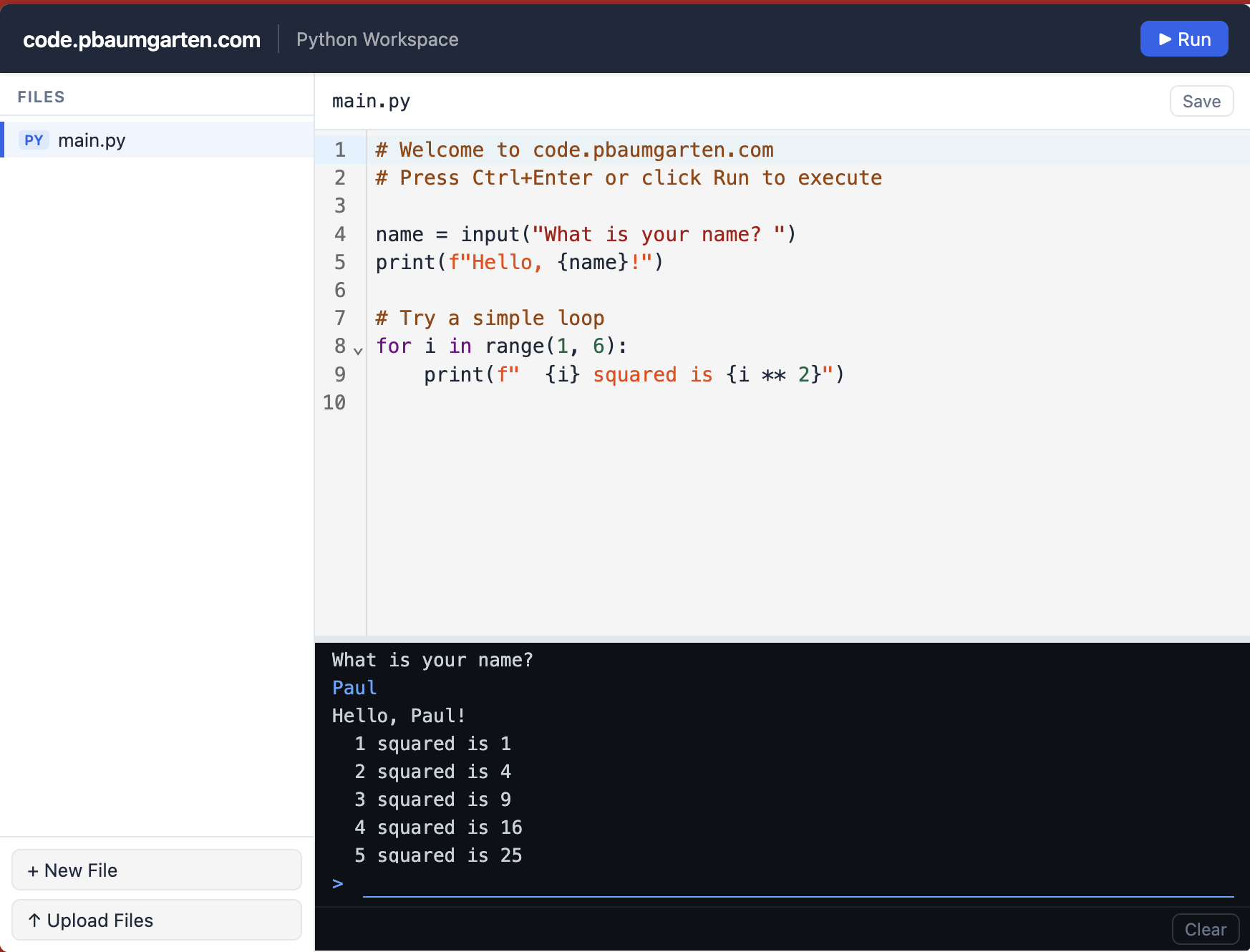
Python code editor showing a simple interactive program with console output
Data Visualisation & Image Processing

Charts and images rendered inline

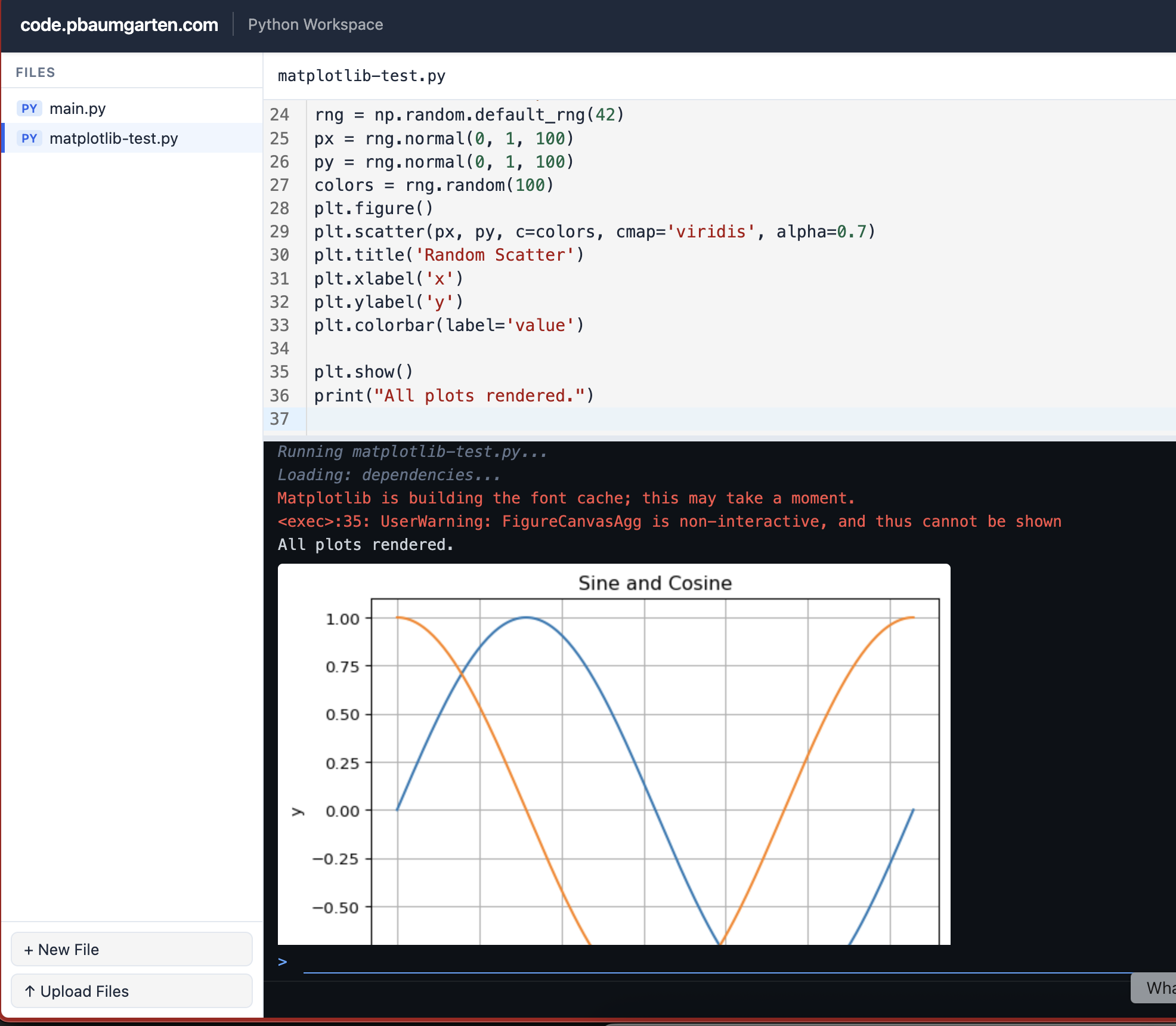
Students can use matplotlib to create graphs and visualisations, and Pillow (PIL) to open, edit, and process images. Both render directly in the console panel — no configuration required.

Data analysis, mathematical visualisation, and image processing tasks become a first-class part of the curriculum, not an afterthought.

  • Full matplotlib support out of the box
  • Plots display inline, immediately below the code
  • Supports line charts, bar charts, scatter plots, and more
  • image.show() renders PIL images inline
Code editor showing matplotlib code with a rendered sine and cosine plot
Student Experience

Every student gets their own workspace

The student dashboard shows personal projects and teacher-assigned exercises in one place. Students can see exactly where they stand — which exercises are complete, which tests are passing, and what still needs work.

  • Personal projects separate from class exercises
  • Live test scores with colour-coded progress bars
  • One-click access to any project or exercise
  • Overall progress summary at the top of the page
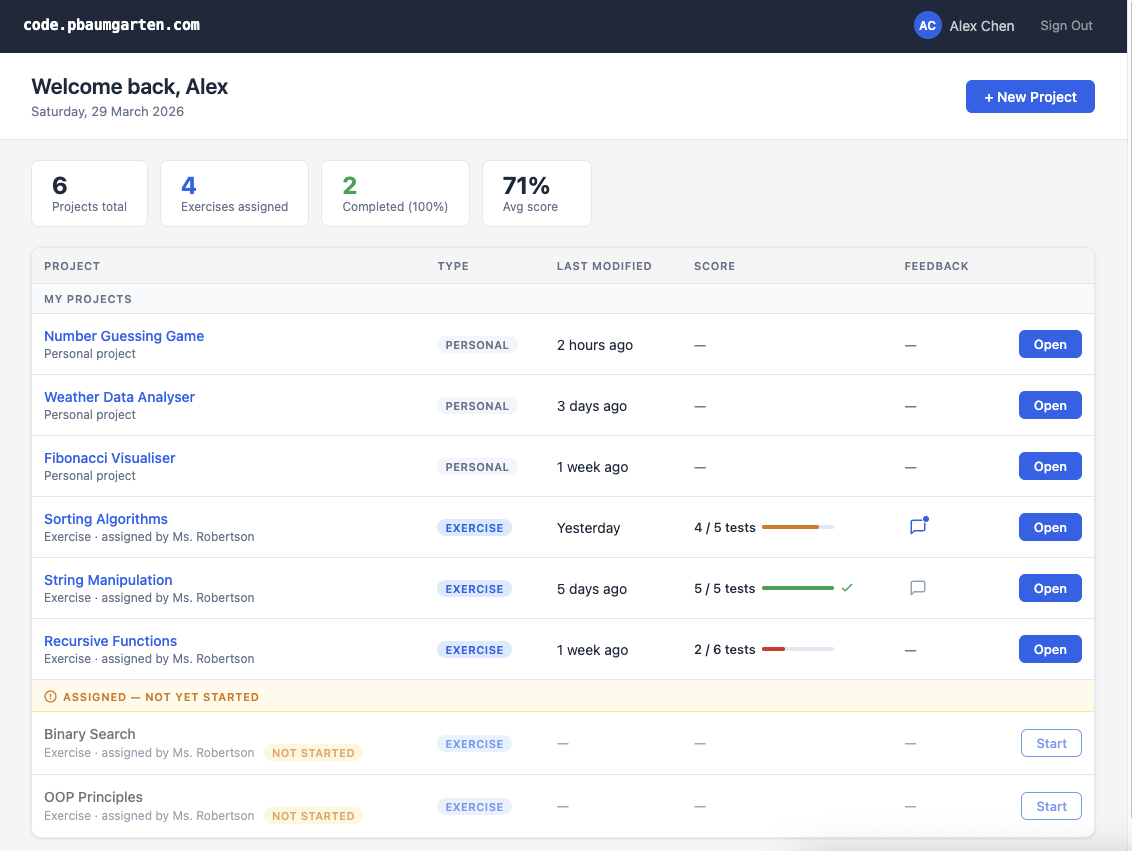
Student dashboard showing personal projects, assigned exercises, and test scores
Teacher Dashboard

Monitor every student at a glance

The Students tab gives teachers a real-time overview of the entire class — last active, exercises completed, and average test score — all on one screen.

Students who haven't logged in recently are flagged automatically, so teachers can identify who needs a nudge before they fall behind.

  • Class grouped by teaching group
  • Last active timestamp for every student
  • At-risk students highlighted automatically
  • One click to view a student's full submission history
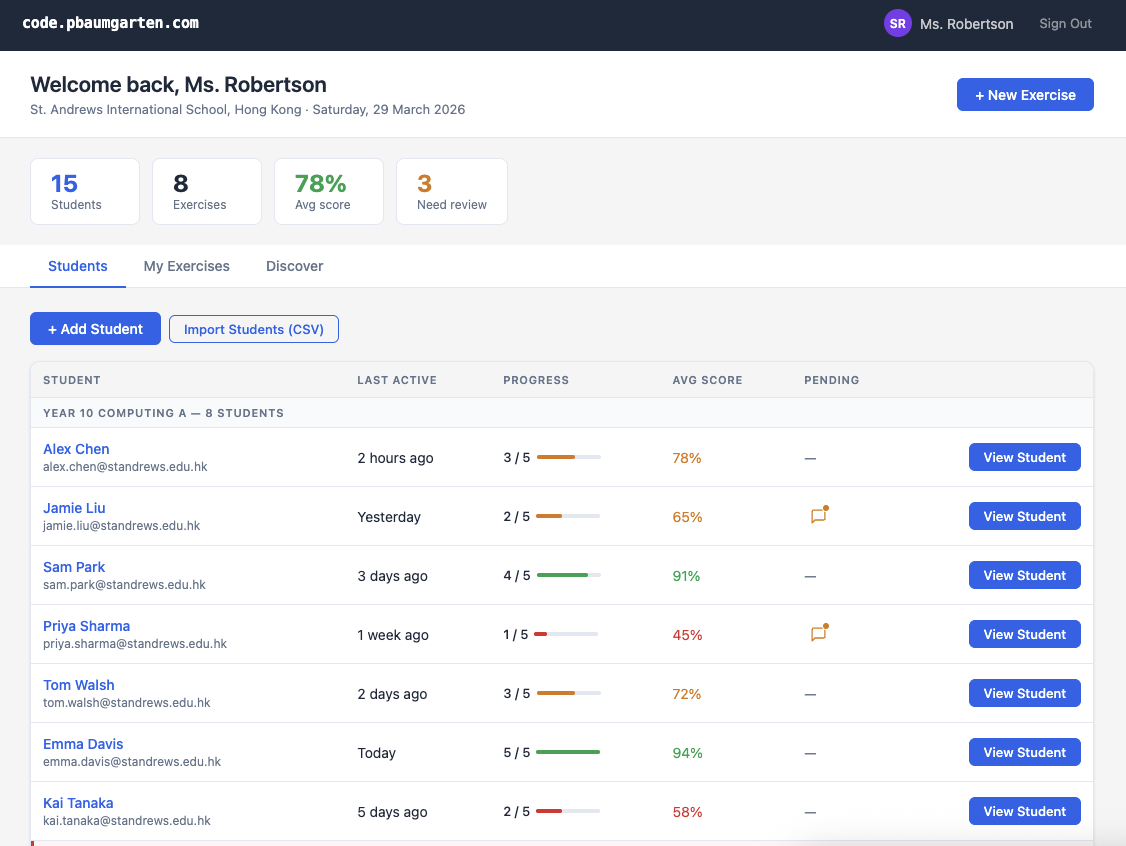
Teacher dashboard Students tab showing the full class list with progress and scores
Assessment & Feedback

Automated grading with per-student drill-down

Every exercise shows a class-wide completion rate and average test score. Expand any exercise to see a per-student breakdown — exactly who passed, who is struggling, and where to leave targeted feedback.

  • Unit test results scored automatically on submission
  • Expandable per-student results table for each exercise
  • Leave inline feedback directly on a student's submission
  • Colour-coded scores make progress visible at a glance
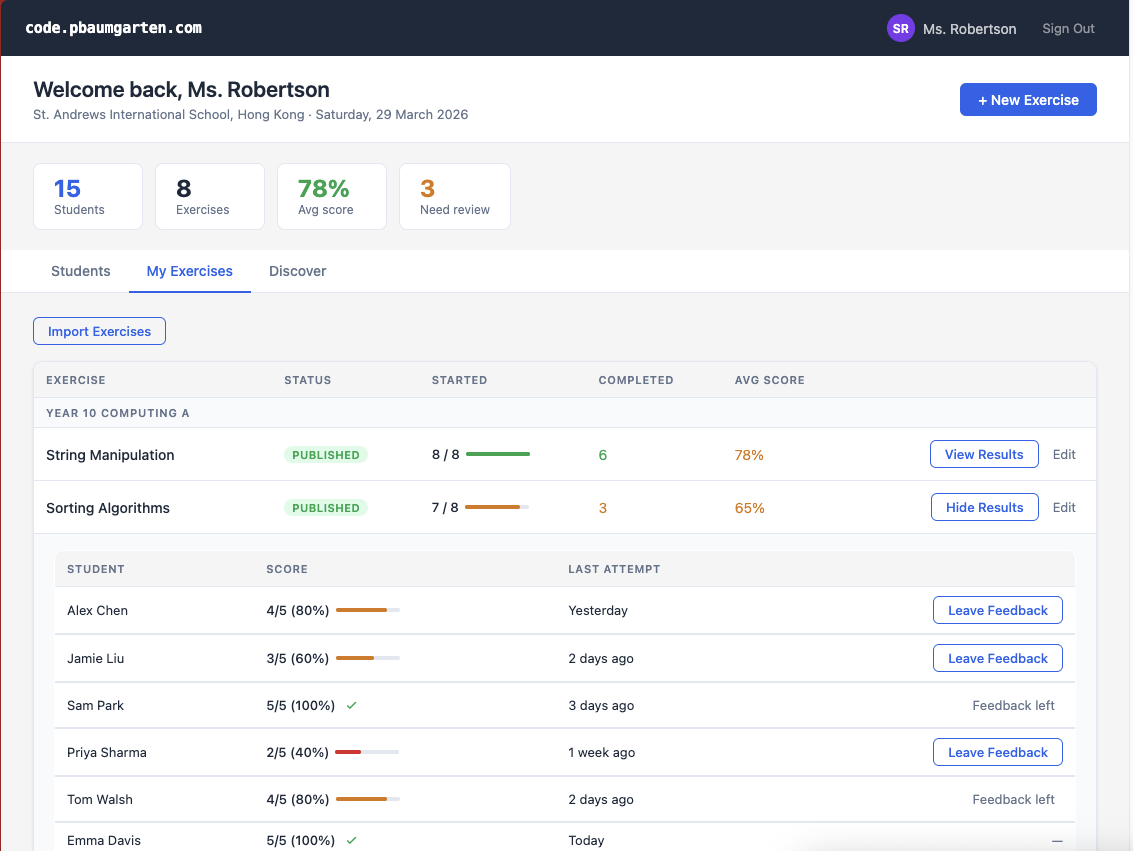
Teacher dashboard Exercises tab with per-student results expanded showing scores and feedback buttons
Exercise Library

A growing library of community exercises

The Discover tab lets teachers browse exercises shared by educators around the world. Filter by year level, difficulty, or curriculum tag, then import any exercise into your own library with one click.

  • Exercises across year levels and topics
  • Filter by year group, difficulty, and curriculum (IB, AP, GCSE)
  • One-click import into your exercise library
  • Publish your own exercises for others to use
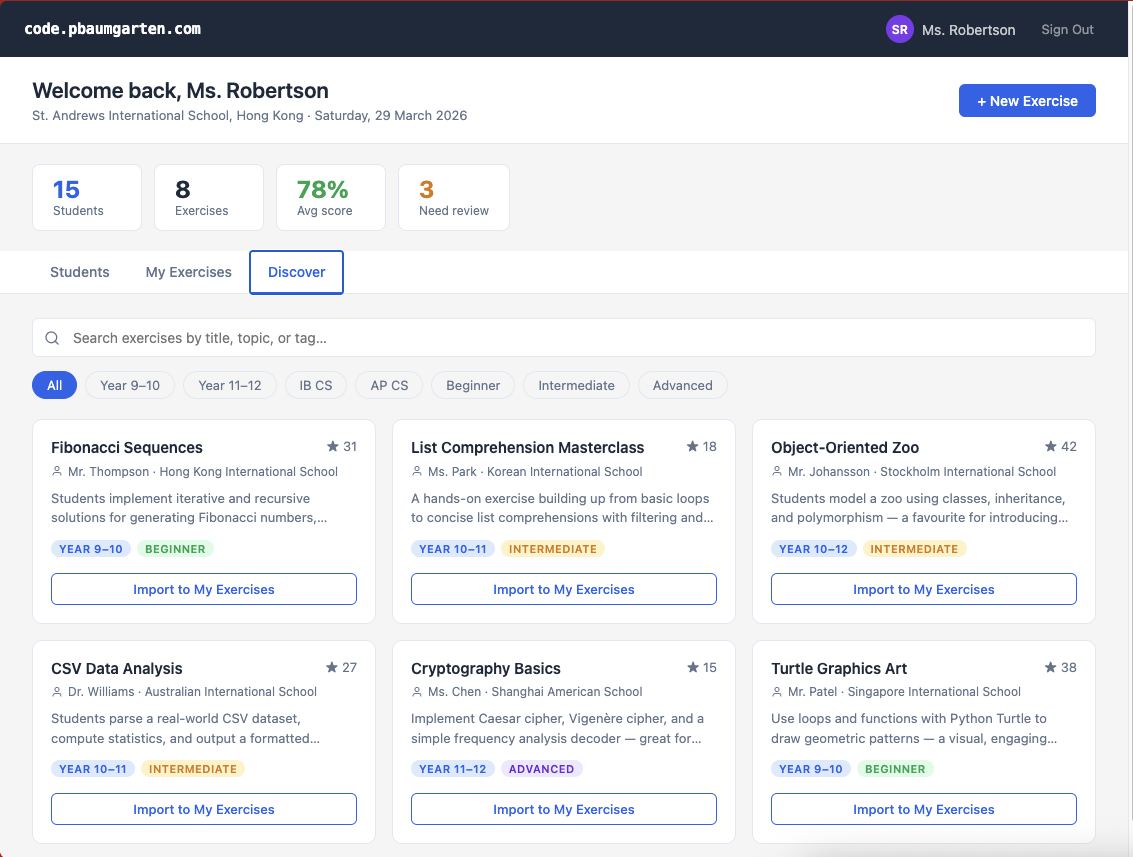
Teacher dashboard Discover tab showing a grid of community-shared exercises with import buttons

By an educator, for educators

The rise of AI is remarkable but unlocking its full potential still demands a strong foundation in logic, computational thinking, abstract reasoning, algorithms, and data structures. Just as calculators never eliminated the need to understand arithmetic, AI won't eliminate the need to understand programming. The fundamentals still matter.

code.pbaumgarten.com was born from a gap that opened when previous providers exited the education market in favour of AI-assisted “vibe coding”. Built by a classroom teacher with two decades of experience, it gives teachers and students a focused, distraction-free space for learning real programming skills.

About the developer

Paul Baumgarten is an educator with over 20 years of experience bringing Computer Science to life for secondary students across Australia, Switzerland, and Hong Kong. He is a co-author of Computer Science for the IB Diploma (published by Hachette Learning), founder of CodingQuest, an international programming competition that attracted more than 100 competing schools from 2022-2024, and a co-founder of CodeHers Hong Kong, an initiative supporting girls in computing since 2024.

Help shape the future of CS education

We’re looking for CS teachers who want to trial code.pbaumgarten.com with their classes while the platform is being built. Early adopters get free access for themselves and their students in return for feedback and suggestions — and the added benefit of having the tool shaped around their real classroom needs.

Free access to the Premium plan throughout development

Full use of the platform at the Premium tier, at no cost for you and your students, for as long as the platform core is in active development.

Your feedback drives the roadmap

What gets built next is directly influenced by what teachers in the trial tell us. This is your chance to get a tool that actually fits your classroom.

Join a community of educators

Connect with other CS teachers who are serious about keeping real programming skills at the heart of their curriculum.

Register your interest →

No commitment required — just let us know you’re interested.